LeafLife: A Landscaping Website Template Built with Next.js and WordPress
LeafLife is a clean, fast website template for landscaping companies. I designed and built it with Next.js, and the owner can manage every service and project from WordPress.
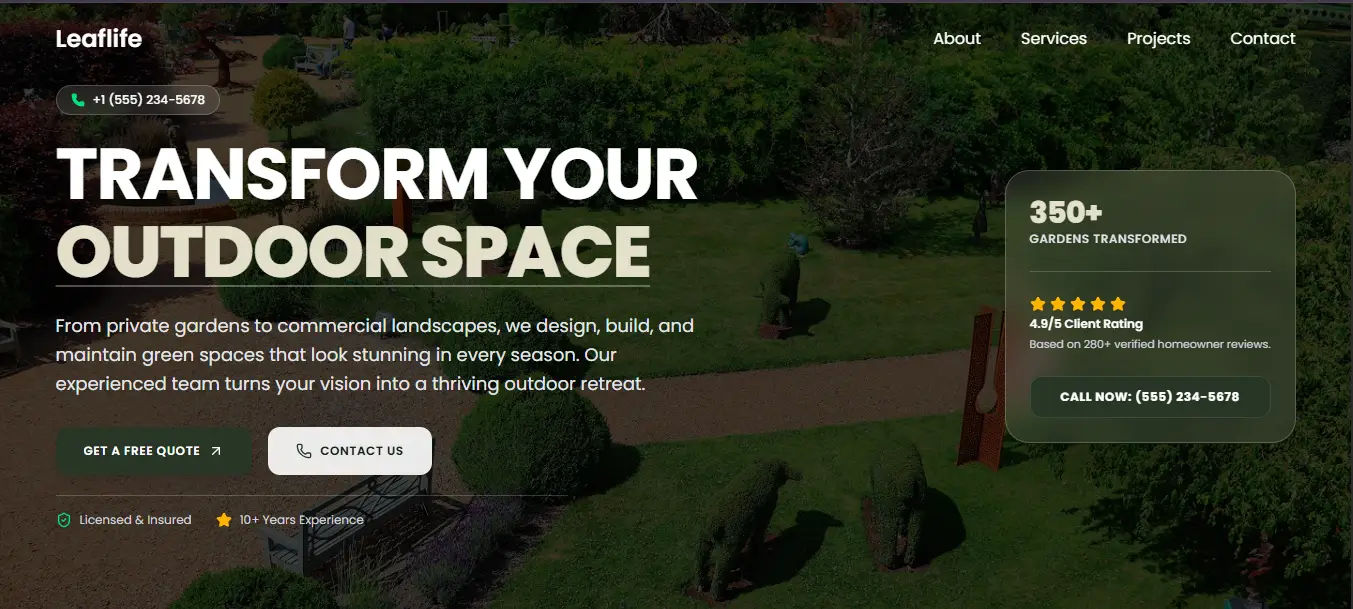
LeafLife is a website template I built for landscaping companies. The goal was simple: give a garden business a site that looks as good as the work it does, and let the owner update it without calling a developer every time.
The Brief
Most landscaping websites I came across had the same problems. They were slow, full of stock photos, and hard to update. A company might finish a beautiful garden on Monday, but the new project would not appear on the site for weeks.
So I set three goals for this template:
- A calm, natural design that puts photos first
- Fast loading on both mobile and desktop
- An easy way to add new services and projects without touching code
Design Approach
Landscaping is a visual business, so the design stays out of the way. I used a soft cream background, deep forest green sections, and bold Poppins headings. Large images do most of the talking.
A few small details made a big difference:
- Two-tone headings. One part of the heading is bold and dark, the other is grey or light. It adds rhythm without needing extra graphics.
- Short, clear sections. Each section has one job, whether that is building trust, explaining the process, or asking for an estimate.
- Simple icons. Cards use light line icons so the content stays easy to scan.
Pages and Sections
The template includes everything a landscaping company usually needs:
- Home: Hero section, reasons to choose the company, a four-step process, services, recent projects, a free estimate form, and client reviews
- About: Company story, core values, and a clear call to action
- Services and Projects: Listing pages with individual detail pages for each item
- Contact: Contact details and a message form
- Legal pages: Terms and Conditions and Privacy Policy
Managing Content from WordPress
This is the part I am happiest with. The site pulls its content from WordPress, so the owner works in an editor they already know.
- Services have a title, excerpt, content, and featured image.
- Projects have the same fields plus a custom Location field, which shows on the project card and the detail page.
- Headings, lists, and images are added with the normal block editor.
- SEO titles and descriptions are set per page, so every service and project can rank on its own.
When a new project is published, it appears on the website without any code changes.
Tech Stack
- Next.js for the front end, routing, and fast page loads
- WordPress as the content manager
- Custom post types and custom fields for services and projects
- Responsive CSS built for phones first
- Lucide icons for the card icons
SEO Setup
I treated SEO as part of the build, not an afterthought.
- Unique meta titles and descriptions for every page
- One H1 per page with a clear heading structure
- Descriptive image alt text
- Clean, readable URLs such as
/services/garden-design-planning - Fast loading, which helps both rankings and visitors
Challenges
The biggest challenge was balancing flexibility with simplicity. I wanted the owner to have control, but not so many options that the design could break. Keeping the content fields few and clear solved this. Another challenge was making long text, like service descriptions, look good with the same layout every time. Consistent heading sizes and spacing fixed most of it.
The Result
The final template is clean, quick, and easy to manage. A landscaping company can add its own logo, colours, and photos, then start publishing services and projects the same day.
- Need a similar website? Contact me and tell me about your business.